Takeoffs that
price themselves.
Draw on the plan — lengths, areas and counts land in your worksheet already priced from your own rates. PDF plans or 3D models, any trade, quoted before the site visit's booked.
7 days free · no credit card · cancel anytime
Worksheet — Stage 1 rough-in
Pricing live65mm PVC-U pipe
Length · Level 2
128.4 m
$2,146.68
Floor waste FW-80
Count · 12 found by Count Assist
12
$1,014.00
Membrane to wet areas
Area · Bathrooms A–C
64.2 m²
$3,467.16
Labour — rough-in
Formula · 0.15 h per metre
19.2 h
$2,790.76
Stage total
$9,418.60
One tool for every trade
How it works
From plan to priced quote, in four steps
The whole takeoff happens in your browser — measure, price, and send.
- 1
Upload
Drop in a PDF plan set or a 3D model — Revit or IFC. No CAD software, no plugins.
- 2
Set the scale
Pick two points at a known distance and Tally calibrates the sheet, so every measurement is true to size.
- 3
Measure & count
Draw runs, trace areas, and count symbols. Quantities build as you go — with Count Assist's symbol detection when you want a hand.
- 4
Price & export
Rates and formulas turn quantities into a quote. Export a CSV or a marked-up plan PDF.
See it work
Real takeoff, start to finish
Four short films from the actual app — measure, count, model takeoff, and export.
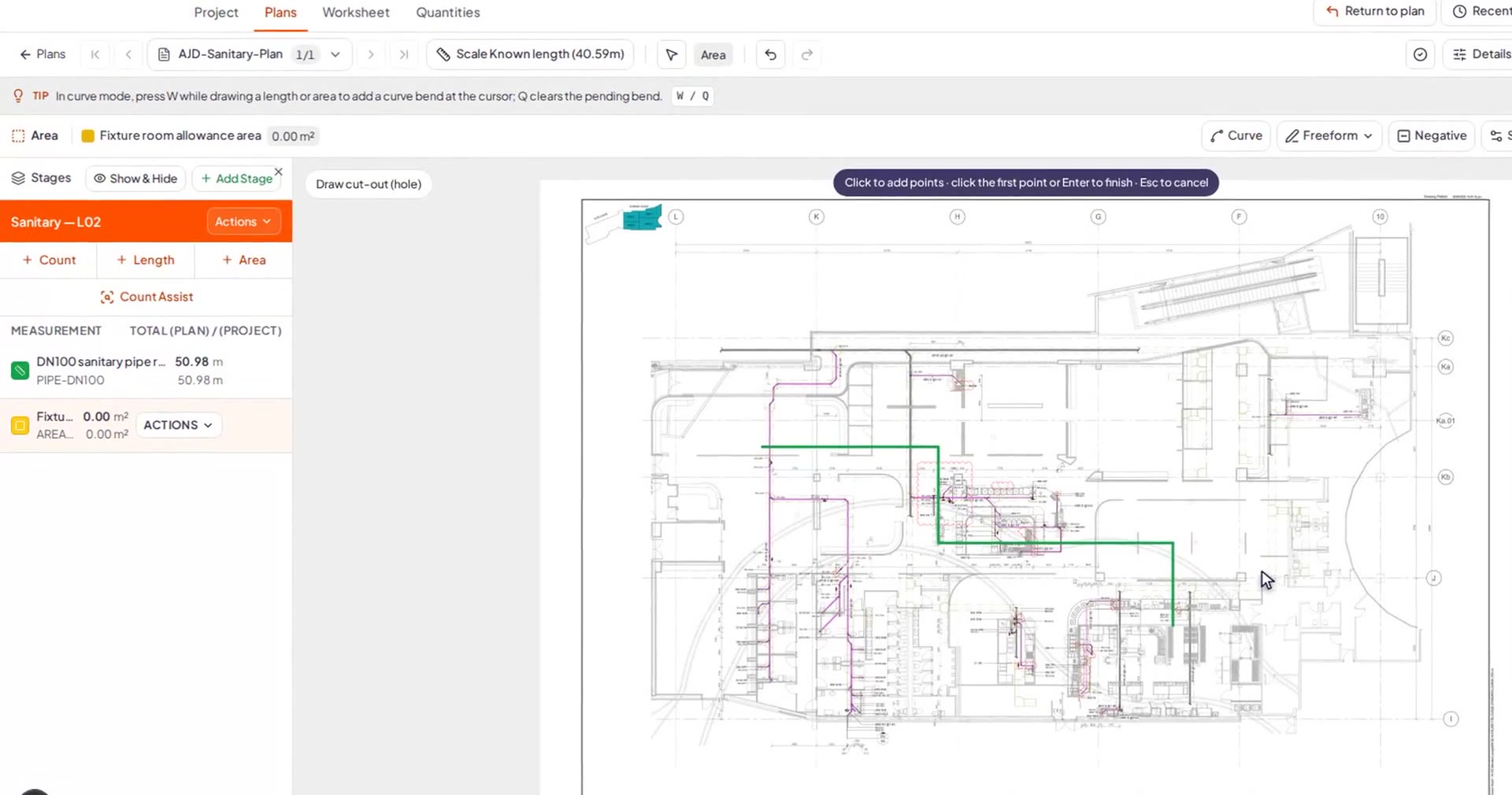
AI-assisted takeoff
Measure straight off the plan
Set the scale, then draw runs for lengths, trace areas, and drop counts — Tally keeps the running total as you work. The AI-assisted part is real: Count Assist's visual symbol detection scans the sheet and surfaces repeating symbols for you to confirm, so the fiddly counting becomes a quick review instead of a manual slog. Every measurement stays yours to check and adjust.
- Length, area and count measurements on any PDF plan
- AI-assisted counting with Count Assist's visual symbol detection
- Quantities and prices update live as you measure
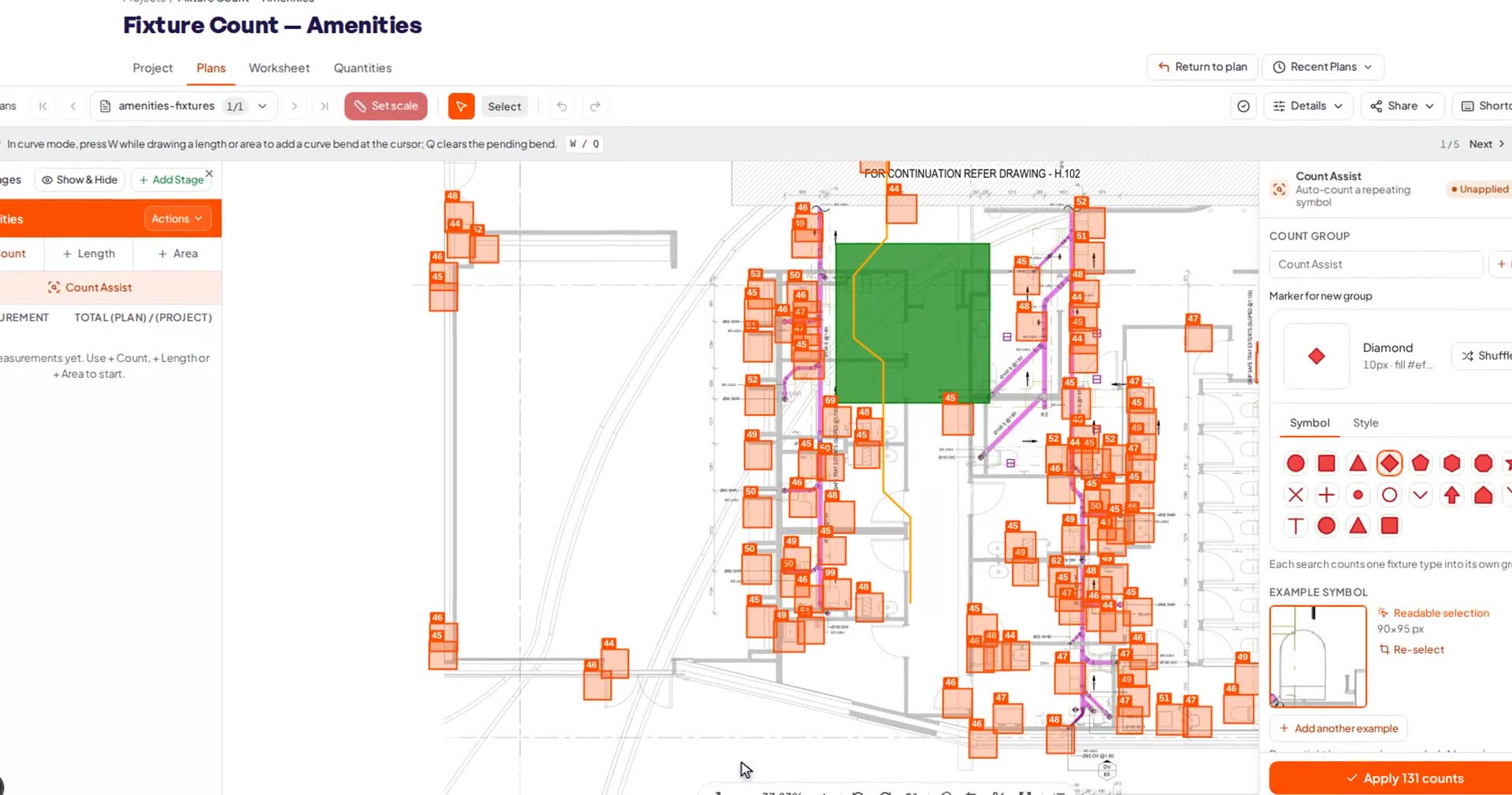
Count Assist
Count a whole sheet in one pass
Pick a symbol once and Count Assist scans the sheet and surfaces every likely match as a list of candidates for you to review and confirm — false positives included, so it's a fast review pass rather than a black-box auto-count. A sensitivity slider tunes how hard it looks: on a real sanitary plan it surfaced 5 of 6 target symbols at the default setting — where a market-leading tool found just 1 of 6 — and all 6 once we turned the sensitivity up.
- Visual symbol search — review and confirm the candidates it finds
- Sensitivity slider trades recall for a shorter review list
- 5 of 6 at default, all 6 at higher sensitivity — vs 1 of 6 for a market-leading tool
Measured on a real sanitary plan: 5 of 6 symbols surfaced at the default setting (alongside a review list of candidates), all 6 at a higher sensitivity setting; a market-leading tool found 1 of 6.
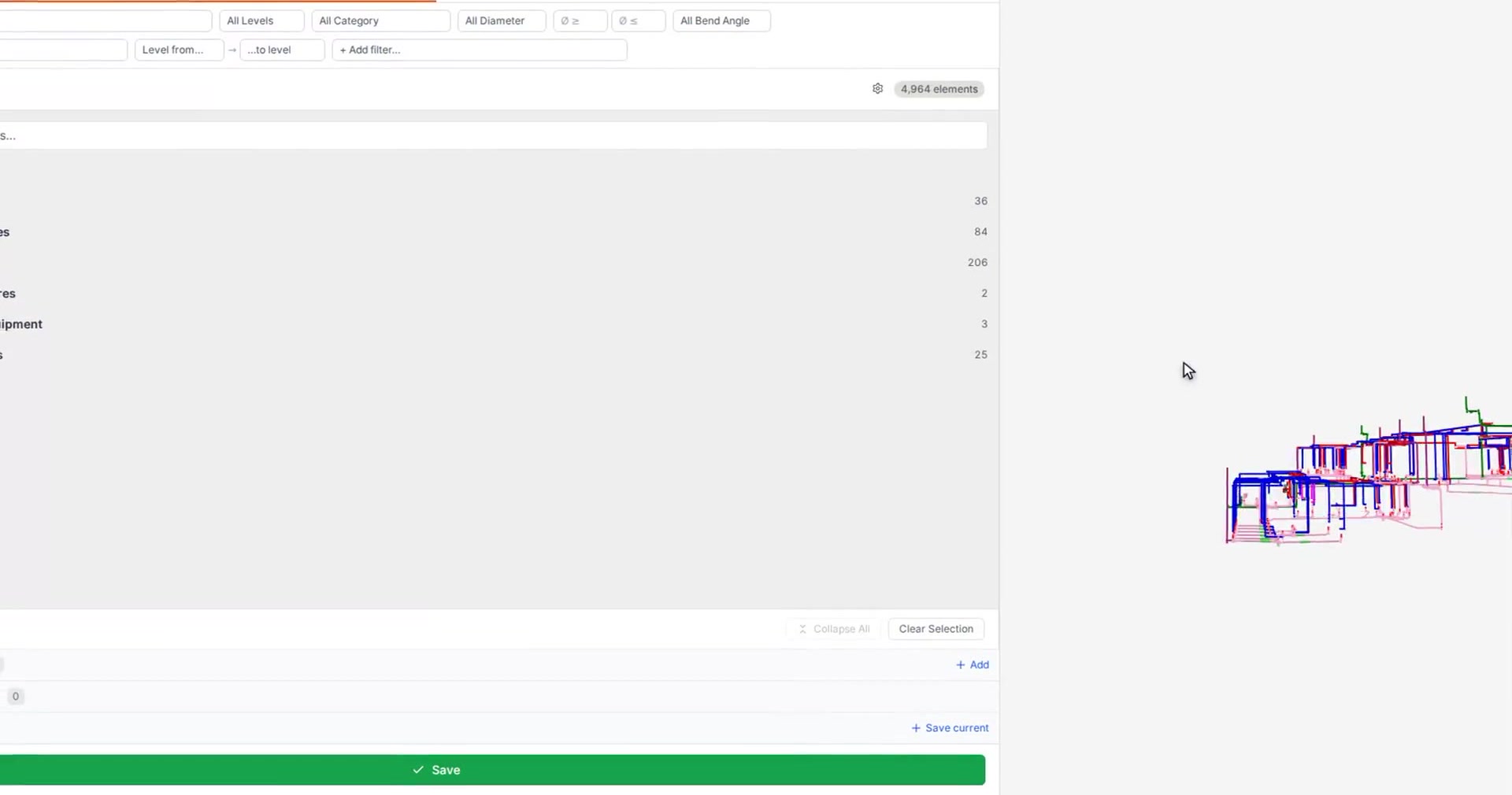
3D model to BOQ
Take off from a 3D model, too
Upload a Revit or IFC model, spin it in the browser, and pull quantities straight off the elements. Every element and parameter is captured at ingestion — nothing trimmed by view or workset — so your bill of quantities reflects the whole model, not a slice of it.
- Revit and IFC models, viewed right in the browser
- Full-model capture — no data dropped at upload
- Select an element to see it in the quantities table
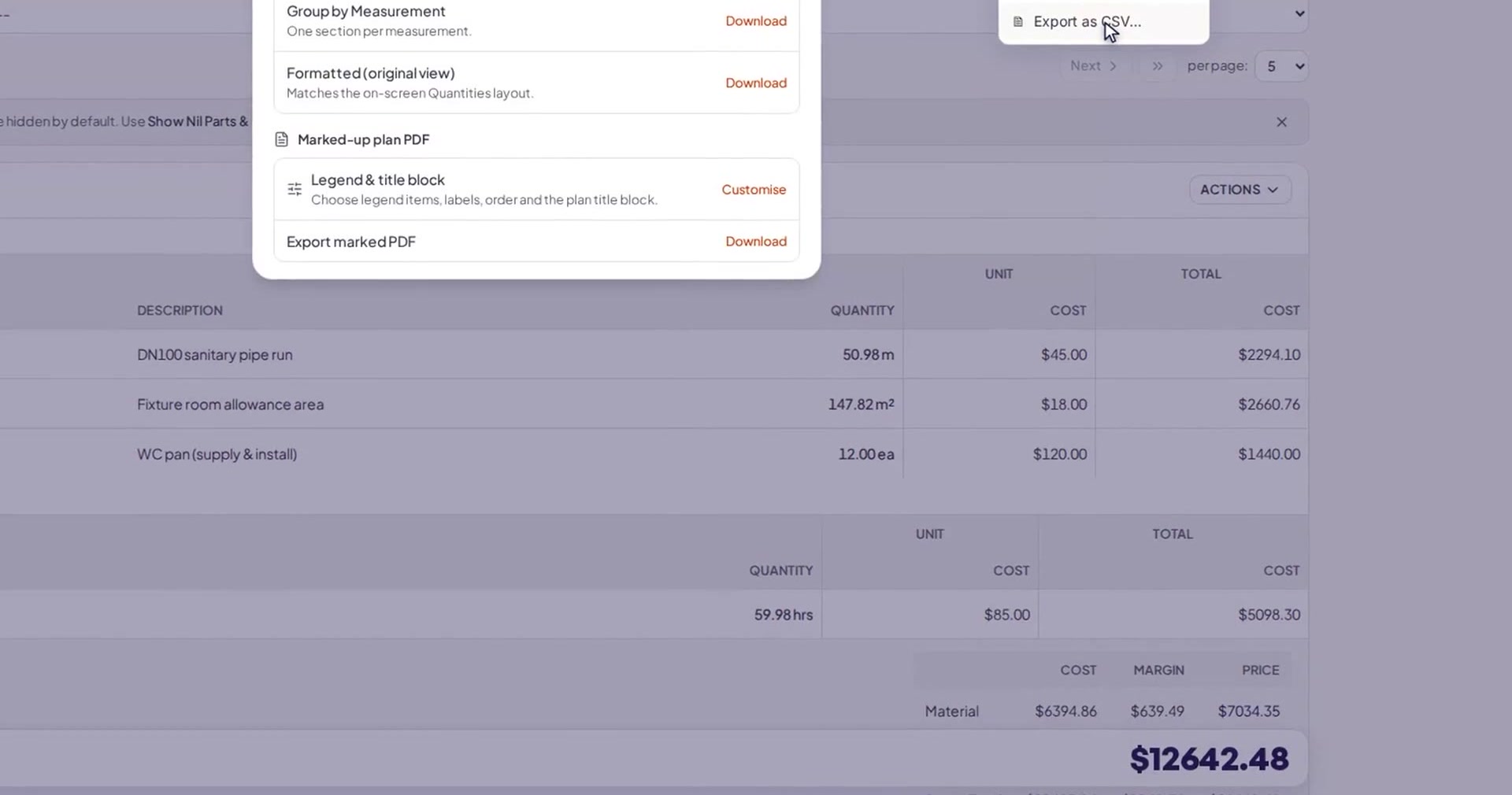
Worksheet & export
Turn quantities into a quote
Your measurements land in a worksheet with rates, formulas and a reusable price book, grouped and totalled the way you quote. When it's ready, export a clean CSV for your spreadsheet or a marked-up plan PDF with a legend — so what you send matches what you measured.
- Rates, formulas and a reusable price book
- CSV export and marked-up plan PDF with a legend
- Reusable templates so every job starts set up
Everything in one place
A full takeoff and estimating workbench
Plans, models, measurements, pricing and exports — no spreadsheets bolted on the side.
Plan upload & scale
Upload any PDF plan set, flip through sheets, and set a true scale from two known points — no CAD, no plugins.
Measure, count & area
Draw runs for lengths, trace areas, and drop counts. Everything you measure feeds one running takeoff.
Worksheet, rates & price book
Turn quantities into money with rates, formulas and a reusable price book — grouped and totalled the way you quote.
Templates
Save the way you set up a job as a template, so the next quote starts with your categories, rates and columns ready.
Exports
Send a clean CSV to your spreadsheet, or a marked-up plan PDF with a legend — what you export matches what you measured.
3D model takeoff
Upload a Revit or IFC model and pull quantities straight off the elements — the whole model captured, not a single view.
Integrations
Push your quote where you already work
Tally connects to the accounting and job-management tools trades already run — so a finished takeoff doesn't get re-typed.
Product names are trademarks of their respective owners.

Quote wherever the work is
Fast on site, secure by default, and easy to share with your crew.
On site
Built for the ute and the iPad
Works on the tools
Runs in any modern browser — laptop in the office, iPad on site. Big touch targets, built to use with work gloves.
Daylight legible
High-contrast type and numbers you can read in the ute — quoting doesn't stop when you leave the desk.
Security & teamwork
Secure, and shared on your terms
Your data stays yours
Secure sign-in, and you only ever see your own projects. Nothing is shared unless you choose to share it.
Bring your team
Invite teammates to a project with the right level of access, so estimators can quote together on one takeoff.
Pricing
Start free. No credit card.
Try Tally on your own jobs for seven days with full access to everything we've built. We'll show you plans before you ever pay.

Free trial
Full access · no credit card · cancel anytime
- Plan upload, scale and unlimited measurements
- Count Assist — AI-assisted visual symbol detection
- 3D model (Revit / IFC) takeoff
- Worksheet, price book, CSV and marked-plan PDF exports
- Integrations with your accounting and job tools
Already have an account? Sign in
Win your next job with a faster takeoff
Measure, price and send your first quote today — for every trade, from any browser.
7 days free · no credit card